BehaviorTables
BehaviorTables are a powerful feature that allows you to define and automate behaviors within your application.
As of Disfox 0.1.0, BehaviorTables can only be attached to Slash Commands.
A BehaviorTable is essentially a collection of rules that define how a command should behave under specific conditions. In future versions, support will also be extended to Discord events.
With BehaviorTables, you can easily allow or restrict users from using specific commands, execute actions when a rule is violated, and centralize permission-related logic in a clean and reusable way.
They introduce the concept of attachable behaviors, allowing restrictions and actions to be shared across multiple Disfox components.
Currently, BehaviorTables are only compatible with Disfox Slash Commands.
Imports
// ESM
import { BehaviorTable, BehaviorContext } from "disfox";
Usage
Creating a BehaviorTable
import { BehaviorTable, BehaviorContext } from "disfox";

const table = new BehaviorTable({
    context: BehaviorContext.SlashCommand,
    onViolate: {
        alert: {
            content: "This command is not available for you.",
            flags: 64 // Ephemeral (optional)
        },
        log: {
            content: "User attempted to execute a restricted command.",
            level: "warn"
        }
    }
});
Parameters
context— Defines the table context. Accepts a value from theBehaviorContextenum.onViolate— Defines which actions should be executed when a rule is violated.
Complete Example
import { SlashService, BehaviorTable, BehaviorContext, SlashTag } from "disfox";
import fs from "fs/promises";
import path from "path";
import { fileURLToPath } from "url";

const dn = path.dirname(fileURLToPath(import.meta.url));
const filepath = path.join(dn, "..", "data", "restricted.json");

const restricted = await fs.readFile(filepath, "utf-8");
const parsed = JSON.parse(restricted);

const table = new BehaviorTable({
    context: BehaviorContext.SlashCommand,

    restricted: {
        userId: parsed
    },

    onViolate: {
        alert: {
            content: "This command is not available for you.",
            flags: 64 // Ephemeral (optional)
        }
    }
});

const command = new SlashService.Command("ping")
    .description("Replies with Pong!")
    .dock(table)
    .action(async interaction => {
        await interaction.reply("Pong!");
    });

export default command;
Result
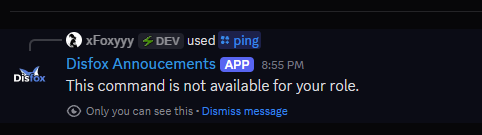
Input Structure
The previous example only demonstrates a small subset of available actions. The onViolate property supports the following structure:
{
    onViolate: {
        alert?: {
            content: string,
            flags?: number
        };
        sendDM?: {
            content: string,
        };
        function?: (...args: any[]) => void;
        applyTimeout?: {
            reason?: string,
            duration: number
        };
        applyVoiceMute?: {
            mute: boolean,
            reason?: string
        };
        kickOfGuild?: {
            reason?: string
        };
        banOfGuild?: {
            reason?: string,
            deleteMessageSeconds?: number
        };
    }
}
| Action | Description | Properties | Example |
|---|---|---|---|
alert | Sends an alert message when a violation occurs. | content, flags? | alert: { content: "You cannot use this command." } |
sendDM | Sends a direct message to the user. | content | sendDM: { content: "You have been punished." } |
function | Executes a custom function when a violation is detected. | (...args: any[]) => void | function: (...args) => console.log(args) |
applyTimeout | Applies a timeout to the guild member. | duration, reason? | applyTimeout: { duration: 60000 } |
applyVoiceMute | Mutes or unmutes the member in voice channels. | mute, reason? | applyVoiceMute: { mute: true } |
kickOfGuild | Removes the member from the guild. | reason? | kickOfGuild: { reason: "Rule violation" } |
banOfGuild | Bans the member from the guild. | reason?, deleteMessageSeconds? | banOfGuild: { deleteMessageSeconds: 3600 } |